Page 1 of 1
Clean Blog: Top Menu floating in content
Posted: Sun Aug 10, 2025 3:07 pm
by Huhu
Hi!
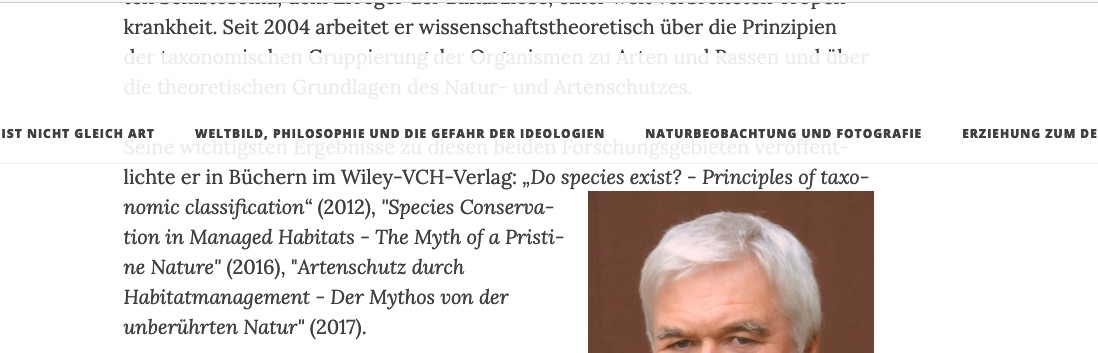
When using Clean Blog, the top menu bar hovers at the top of the window when scrolling down, as ist should.
But when I scroll up again, the menu bar "hangs" too low, covering some of the content while more content above it is still visible, instead of clinging to the top of the window.
Example page:
http://kunz-artenschutz.de/index.php?/vita.html
Screenshot:
- Screenshot 2025-08-10 at 15.06.47.jpg (90.91 KiB) Viewed 37477 times
Re: Clean Blog: Top Menu floating in content
Posted: Sun Aug 10, 2025 7:15 pm
by onli
Not a solution tet, observation: When you scroll up the JS sets .is-visible to the navbar (.navbar-custom). This adds a transform:
Code: Select all
@media only screen and (min-width: 1170px) {
  .navbar-custom.is-visible {
    -webkit-transform: translate3d(0, 100%, 0);
    -moz-transform: translate3d(0, 100%, 0);
    -ms-transform: translate3d(0, 100%, 0);
    -o-transform: translate3d(0, 100%, 0);
    transform: translate3d(0, 100%, 0);
  }
}
Disabling those transforms fixes the buggy behaviour (under Firefox).
Solution: Unclear, maybe the bulletproof version can be updated without too much work and would fix this? Otherwise the theme's javascript could be changed to not add .is-visible, but I assume it gets set for a reason?
Re: Clean Blog: Top Menu floating in content
Posted: Thu Oct 02, 2025 9:27 am
by Huhu
Hi!
Sorry I was away. Thanks for your suggestion! I applied the fix you mentioned, and the menu now stays on top of the visible content. Yet if I try to prevent it from scrolling down with the content, I couldn't find a solution through css (position: fixed doesn't do the trick).
Re: Clean Blog: Top Menu floating in content
Posted: Fri Oct 17, 2025 12:16 pm
by onli
Hi, I just merged a bigger update of the clean-blog theme, at
https://github.com/s9y/Serendipity/pull/923. Updates all the libraries used, including bootstrap. Bootstrap wasn't updated to the newest version, but it got some updates (the old v3 got some minor updates before it was replaced by v4, updates missing in clean blog so far). Maybe you want to test how the new version behaves in your blog / whether it fixes the floating menu :)
Re: Clean Blog: Top Menu floating in content
Posted: Mon Oct 27, 2025 2:29 pm
by Huhu
Great! Checking.
UPDATE: Feedback: Sadly, the menu still "lags" if I scroll down and up again – there's still a gap between the upper border of the window and the menu.
Strangely, I thought I did fix this using your suggestions ... which is interesting for they had been implemented in user.css. Has a class changed?
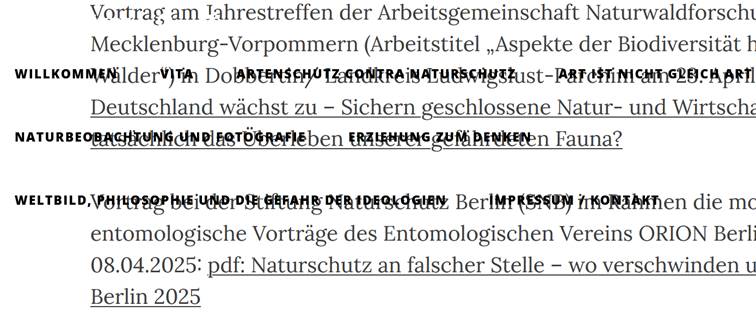
UPDATE 2: It is reported that the floating menu causes problems on smaller screens in terms of readability, e.g. smartphones and tablets.
Re: Clean Blog: Top Menu floating in content
Posted: Tue Oct 28, 2025 8:03 am
by Huhu
PS. Here we go with an example of the floating menu on smaller devices.
- floatingmenu.jpeg (51.18 KiB) Viewed 32490 times
Re: Clean Blog: Top Menu floating in content
Posted: Thu Oct 30, 2025 11:50 pm
by onli
That really looks bad. I put too much time into modernizing the theme, I will check on this as well.
Re: Clean Blog: Top Menu floating in content
Posted: Sat Nov 01, 2025 4:34 pm
by Huhu
Wonderful, thanks!
Re: Clean Blog: Top Menu floating in content
Posted: Thu Nov 06, 2025 12:51 pm
by onli
Ok, the problem here seems to be that the theme does not expect such a wide link list. It then places the right part below the left, which leads to that strange placement when scrolling up. I think I found a simple fix: In templates/clean-blog/style.css, line 138, replace
Code: Select all
  .navbar-custom.is-visible {
    /* if the user changes the scrolling direction, we show the header */
    -webkit-transform: translate3d(0, 100%, 0);
    -moz-transform: translate3d(0, 100%, 0);
    -ms-transform: translate3d(0, 100%, 0);
    -o-transform: translate3d(0, 100%, 0);
    transform: translate3d(0, 100%, 0);
  }
with
Code: Select all
  .navbar-custom.is-visible {
    /* if the user changes the scrolling direction, we show the header */
    top: 0;
  }
Also as a PR at
https://github.com/s9y/Serendipity/pull/939. Please give this a test run, if it works we can fix it in master :)
Side note: On small devices, the theme disables the floating menu completely, there is no fixed header then as far as I could see. That would be the next thing to work on if this fix does not repair it accidentally as well.
Re: Clean Blog: Top Menu floating in content
Posted: Thu Nov 06, 2025 4:06 pm
by Huhu
Hi,
this seems to fix the issue. Thanks!
Re: Clean Blog: Top Menu floating in content
Posted: Thu Nov 06, 2025 4:25 pm
by onli
Okay, I will merge this. Thanks for testing the patch so fast, and please let me know if you see issues with this solution later.