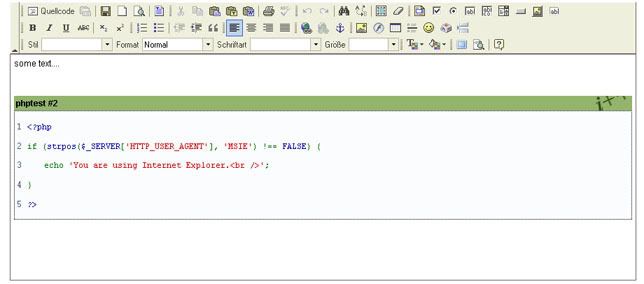
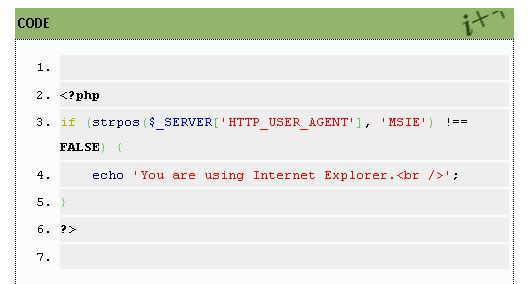
Codebox
Posted: Tue Apr 01, 2008 5:46 pm
Hi Forum.
For a technological blog it is very important to have some decent codeboxes to display some sourcecode. So what are my options here? I certainly dont want to write the tables and divs by myself every time.
My first attempt was to find a nice plugin, which does this for me. I found GeSHi, text_wiki and BBCode. I knew BBCode from the forums, so I gave it a shot. My first impression was good. A nice looking codebox. But not exactly what I was looking for. How could I change the title, the styles and how could I enable it to show linenumbers?
Having no idea how the serendipity plugin systems works, I took a look at serendipity_event_bbcode.php... so far so good. I realized that it only really interprets the "code" thing, and I cannot pass any parameters for my title or something. In addition the styles were hardcoded in this file. WTF? This is not the way I want to go.
My next try was text_wiki. I couldn't even find a proper "codebox" style and for GeSHi i couldn't find any docs (maybe I was a little impatient there).
Ok then. Maybe there is no plugin which enables my to have a decent codebox-environment. I have to make a compromise then. I remembered that the FCKEditor maybe is capable of this. I installed the FCKEditor plugin and quickly realised that it's not. But with a quick tweak you can enable snippets:
- Install the FCKEditor plugin and the latest release of the FCKEditor
- Open the fcktemplates.xml and create a new template for your codebox. Like this:
- Edit fckconfig.js and change these:
Now, change the styles for your code box. You need the edit the styles.css from your current style, the fck_editor.css and the fck_editorarea.css. It may look like this:
Then you have a snippet for a very simple codebox in you FCKEditor.
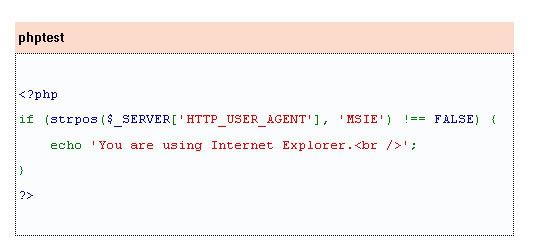
You will notice, that the syntax is colored. Thats only because I copied this from a html page.
This is as near as I could get. I would like to use this thread to collect some alternatives. Maybe I missed something, perhaps there is a plugin out there, which has excatly the features which I need, which are very few:
- Styles should be customizable
- The title should not be fixed
- Line numbers are optional shown
- Syntax coloring would be nice
If there is a plugin, please notify me.
Cheers,
thedave
For a technological blog it is very important to have some decent codeboxes to display some sourcecode. So what are my options here? I certainly dont want to write the tables and divs by myself every time.
My first attempt was to find a nice plugin, which does this for me. I found GeSHi, text_wiki and BBCode. I knew BBCode from the forums, so I gave it a shot. My first impression was good. A nice looking codebox. But not exactly what I was looking for. How could I change the title, the styles and how could I enable it to show linenumbers?
Having no idea how the serendipity plugin systems works, I took a look at serendipity_event_bbcode.php... so far so good. I realized that it only really interprets the "code" thing, and I cannot pass any parameters for my title or something. In addition the styles were hardcoded in this file. WTF? This is not the way I want to go.
My next try was text_wiki. I couldn't even find a proper "codebox" style and for GeSHi i couldn't find any docs (maybe I was a little impatient there).
Ok then. Maybe there is no plugin which enables my to have a decent codebox-environment. I have to make a compromise then. I remembered that the FCKEditor maybe is capable of this. I installed the FCKEditor plugin and quickly realised that it's not.
But with a quick tweak you can enable snippets:- Install the FCKEditor plugin and the latest release of the FCKEditor
- Open the fcktemplates.xml and create a new template for your codebox. Like this:
Code: Select all
<Template title="Codebox" image="template1.gif">
  <Description>Codebox snipped</Description>
- <Html>
- <![CDATA[
				<div class="codetop">CODE</div>
				<div class="codemain">

				</div>


  ]]>
  </Html>
  </Template>
Code: Select all
FCKConfig.TemplateReplaceAll = false;
FCKConfig.TemplateReplaceCheckbox = true;
Code: Select all
.codetop,
{
	background: #FDDBCC;
	color: #000;
	font-weight: bold;
	margin: 0 auto 0 auto;
	padding: 3px;
}

.codemain,
{
	background: #FAFCFE;
	border: 1px dotted #000;
	color: #465584;
	font-family: Courier, "Courier New", Verdana, Arial;
	margin: 0 auto 0 auto;
	padding: 2px;
}
You will notice, that the syntax is colored. Thats only because I copied this from a html page.
This is as near as I could get. I would like to use this thread to collect some alternatives. Maybe I missed something, perhaps there is a plugin out there, which has excatly the features which I need, which are very few:
- Styles should be customizable
- The title should not be fixed
- Line numbers are optional shown
- Syntax coloring would be nice
If there is a plugin, please notify me.
Cheers,
thedave